Line drawing tool for coins — free coin tracing tool
Turn a coin photo into a clean black-and-white line drawing
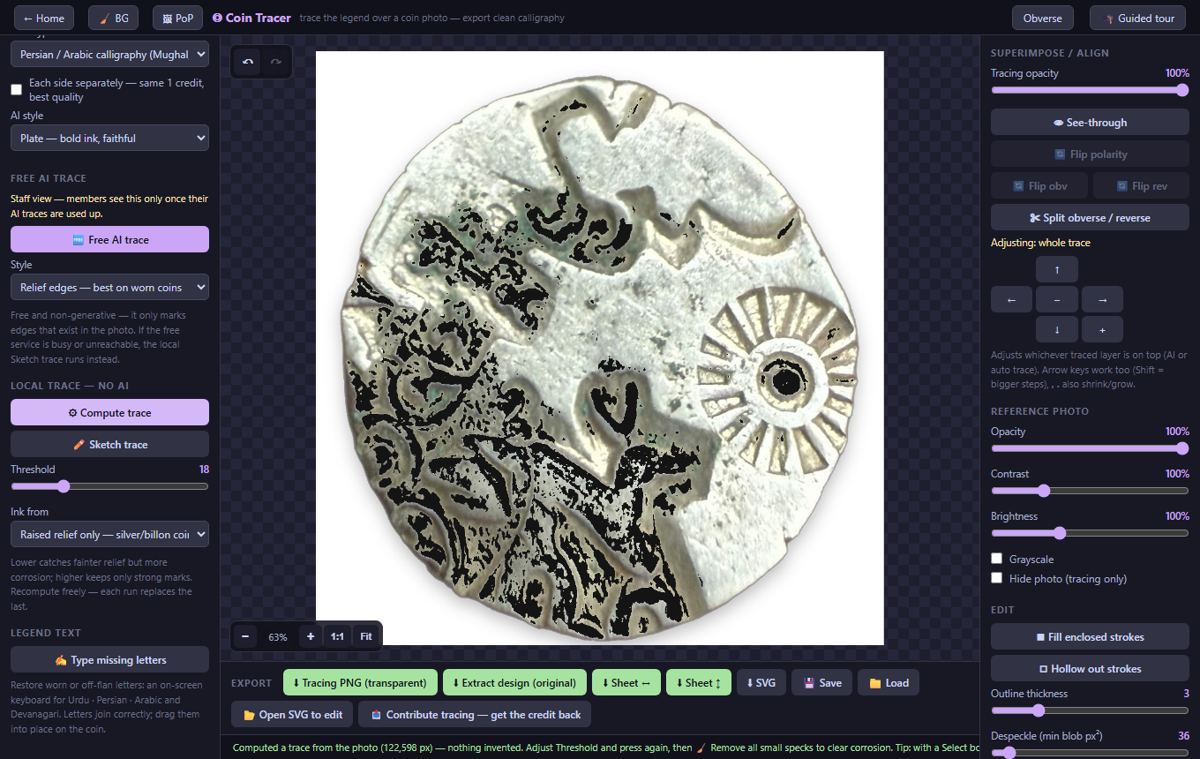
A free online line drawing tool made for coins. Open a photo of a coin and the Coin Tracer turns its legend and design into a clean black-and-white line drawing, the kind printed in coin catalogues and research papers. The tracing is computed from the photo’s own pixels, so it records what is struck on the coin and does not invent strokes. Correct it by hand with pen, line and curve tools, then save it as PNG or SVG. It runs in the browser on phone or desktop, for coins of any country, period and script.
Free · no account · works on phone and desktop · coins of any country.
What it does
Coin photo to line drawing
Compute trace turns the photo into black line work in the browser, with controls for thickness, detail and polarity. No account and nothing to install. Coin Tracer →
Free AI trace
An edge-measuring model that detects the lines actually present in the photo, so it cannot add letterforms the coin does not have. It needs a free account and no credits. Coin Tracer →
AI trace for worn and difficult coins
An optional AI trace for coins the automatic trace cannot read well. Five traces are free per account; after that it uses prepaid credits. Coin Tracer →
Draw and correct by hand
Brush, eraser, tap-erase and a lasso made for flowing cursive, plus straight Line and Curve tools that work as they do in Paint. Every step can be undone. Coin Tracer →
Close gaps and fill letters
Find gaps rings the breaks in an outline and can close them with a hairline; Fill turns hollow outline letters into solid ink. Coin Tracer →
Trace the coin’s edge
The outer edge can be inked as one line measured from the photo, keeping the true outline of an irregular or hammered flan. Coin Tracer →
Type a legend
Arabic/Urdu and Devanagari keyboards add typed legend text as its own layer beside the tracing. Coin Tracer →
Export PNG, SVG or an Illustrator file
Save the line drawing as PNG or SVG, or as an Adobe Illustrator file with editable vector paths that also opens in Inkscape, Affinity Designer and CorelDRAW. Coin Tracer →
Colour vector instead of line art
If you want a scalable colour picture of the whole coin rather than a line drawing, use Photo to SVG. Photo to SVG →
How to make a line drawing of a coin
- Prepare the photo. Take a sharp, evenly lit photo of one side. Removing the background first gives the cleanest result.
- Open it in the Coin Tracer. Open the tracing tool and load the photo.
- Trace. Press Compute trace and adjust thickness, detail and polarity until the legend and design read cleanly. Try Free AI trace or AI trace on a difficult coin.
- Correct by hand. Erase stray marks, draw missing strokes with the brush, Line or Curve tool, and close gaps in outlines.
- Save. Export the line drawing as PNG or SVG, or as an Illustrator file for further editing.
Limits and price
| Price | Free. Compute trace, hand drawing, legend keyboards and PNG/SVG export need no account. Free AI trace needs a free account. The optional AI trace gives five free traces per account, then uses prepaid credits. |
|---|---|
| Input | Any image your browser can open — JPG, PNG, WebP — and Photoshop PSD/PSB files. A sharp, evenly lit photo of one side of the coin works best. |
| Output | PNG, SVG or an Adobe Illustrator file. |
| Scripts | Any, because the drawing comes from the photo and not from a font: Latin, Greek, Arabic and Persian, Devanagari, Brahmi, Chinese and others. |
| Device | Any modern browser on phone, tablet or desktop. |
| What it will not do | It does not redraw a worn coin as it “should” look. Missing letters stay missing unless you draw them yourself. |
Frequently asked questions
Is there a free tool to trace a coin?
Yes. CoinSchool’s Coin Tracer is a free coin tracing tool that runs in the browser. Tracing, hand correction and PNG/SVG export need no account.
How do I turn a coin photo into a line drawing?
Open the photo in the Coin Tracer and press Compute trace. Adjust thickness and detail, correct the drawing by hand, and save it as PNG or SVG.
Is the line drawing made by AI?
Not by default. Compute trace is calculated from the pixels of your photo in the browser. Two AI options are there for difficult coins: a free one that only detects edges present in the photo, and a paid one with five free traces per account.
Will it invent details that are not on the coin?
The tool is built to invent nothing and delete nothing. Compute trace and Free AI trace work only from what is in the photo. After an AI trace, a check compares the ink with the photo and marks strokes it finds no support for, so you can remove them.
Can I use the drawing in a catalogue or research paper?
Yes. The export is your own drawing of your own photo, as PNG for documents or as SVG and Illustrator paths for print.
Does it work on ancient and hammered coins?
Yes. It works on any coin, token or medal: ancient Greek and Roman, punch-marked, Islamic, medieval, Indian, European and modern.
Does it work on a phone?
Yes. It is a web page with a touch layout, not an app download.
Related: Coin Tracer · Coin photo editor · Photo to SVG · How to photograph coins · All coin tools
Realised prices for 450,000+ Indian & world coins from Todywalla, Classical Numismatic Gallery, Bombay Auctions, Virasat, Jain and Stephen Album sales.
Search the full archive free →
Home · Auction Archive · Free Coin Tools · Coin Photo Editor · Coin Line Drawing Tool · Guides · Identify a Coin · Coin Value · Coin Grading · Label Maker · News · Coin Agent · Sell Old Coins · Contact · ❤️ Donate · ✨ Ad-free · About · Privacy · Terms · Refunds